

How did I end up thinking about this?
The idea for this article came to me while I was lying in bed, just letting my mind wander. I remembered meeting the chef at the hotel we were staying at that morning, which reminded me of a relative of mine who did the same job. From there I was thinking about him, then about his family, what they’re all up to these days. Then I paused and thought, hang on!?!! how did I end up here? I started with something completely different, and somehow I’m now thinking about something different. When I traced it back, it all made sense: the job led me to him, he led me to his family, and at no point did I decide where I was going. I just followed one connection to the next.
That’s how we humans wander. We don’t search our memory the way we query a database. We start somewhere and let one thing lead to another.
Useful ideas often come from hops like that. Of course, wandering too far can also leave you three browser tabs deep in something unrelated at midnight. The trick is to find a connection that matters without losing the plot.
So why am I telling you about my late-night thoughts in an article about AI? Because lying there, it clicked that this kind of wandering is exactly what AI-enabled software needs to be able to do at times. Most software without AI functionality knows exactly what it needs. A page shows a customer’s orders, so you fetch that customer’s orders, render them on the page, and that’s it. When you are building with AI it’s different. When you ask an AI to analyse something, the answer usually isn’t sitting in one place, it has to piece it together from different bits of knowledge.
I wanted to write this article because I asked myself: if you want software to wander, how do you actually do it?
That’s when it clicked: give the AI a graph to wander through!
Your AI only knows what its tools hand it
When you build with AI, it’s easy to think the model is the clever part. In practice, the model can only reason over what you give it, and most of that comes from its tools i.e. the searches, lookups and queries it can call to pull in context. I’ve written before about how the real moat isn’t the model you use but the harness you build around it, and this is a big part of why: the tools decide what context the AI can build, and the context decides how good the answer can be.
Now think about what most of those tools sit on. Our data mostly lives in SQL databases and structured records, which are brilliant at giving you exactly what you asked for. Ask for the customers who churned last quarter and you get the customers who churned last quarter, and that’s all you get, with nothing around it.
That’s perfect when you know what you’re looking for. But when an AI is trying to work out why something happened, it doesn’t know what to look for yet. So it gets stuck in a loop: it can only find what it thinks to ask for, and it can only think to ask for what it has already found.
A wandering mind doesn’t have that problem, because it doesn’t wait to be asked. It follows the connections and brings back what sits around the thing you started with, That’s exactly the kind of context an AI needs (sometimes!) to piece an answer together.
Data is messy; knowledge is connected
Data is always messy. In every company I’ve worked in, the facts are scattered across CRMs, ticketing systems, documents and people’s heads. Our brains deal with mess all the time, and the way they make sense of it is by connecting things. The chef I met that morning isn’t a fact sitting on its own in my memory; it’s linked to a hotel, to a relative, to his family. Those links are what turn a pile of facts into knowledge, and they’re also what let me wander.
A graph database can do the same for software. Instead of keeping records in tables, with the connections hidden away in ID columns and free text, it stores the connections themselves: this customer raised that ticket, that ticket was routed to this queue, this queue was retired by that decision. Every connection is something the software can follow, so it can start from one thing and wander to the next, just like I did lying in bed.
That’s the shift I find most interesting. A graph doesn’t just store your data, it stores how it all connects, which is a lot closer to real knowledge than a table of records. What kinds of things exist and how they’re allowed to connect is described in an ontology, a map of your business that is data in its own right, and one the software can read too. More on that later, because that’s where a lot of the value comes from.
Putting it to the test: can software wander?
To test this, I built a small, staged experiment. The aim is simple: put the same data in a SQL database and in a graph database, give the same AI the same question, and see what comes back. !!Spoiler alert!! with the graph, we got the why, while with SQL we got exactly what we asked for and nothing more. (Note that the code is on GitHub, and there’s more on how I built it in the appendix.)
The data is a made-up B2B software company with 67 customers, their support tickets, the product’s features, a few decisions and documents, and the people who work there. It’s loaded twice: once into an ordinary SQL store with keyword search on top, the way most of our systems look today, and once into a graph database.
On top of both sits one chat app (using Chainlit) that sends every question to both at the same time and shows the answers side by side. Each store comes with its own set of tools, and Claude (through the Anthropic API) decides which tools to call to fetch the data it needs. Everything else is identical on both sides: the same model, the same prompt and the same budget of tool calls. The same tools are also available as MCP servers, so you can try it from Claude Desktop or Claude Code too.
So the use case is as follows. The question comes from Charlene, a product manager: “Why did the five customers who churned in Q3 leave?”
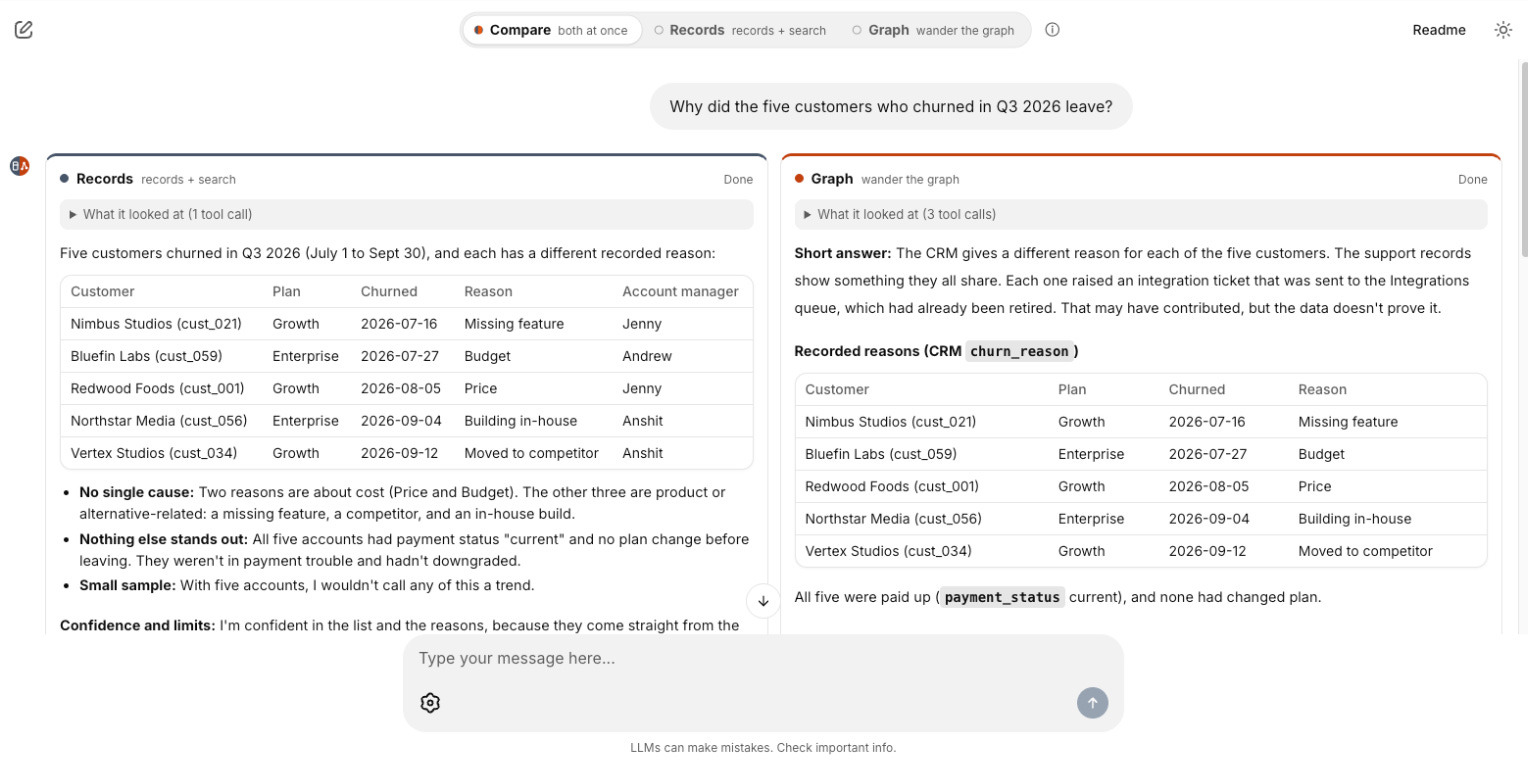
The records version (SQL) came back after one tool call, and it was honest. It found five customers with five different churn reasons in the CRM (price, a missing feature, a competitor, building in-house, and budget) and concluded “I wouldn’t read a pattern into five accounts.” Fair enough, that’s what the records say.
The graph version came back after three tool calls with a very different answer. All five customers had raised support tickets, each about a completely different feature, that were routed to the Integrations queue. That queue was retired in a support reorg back in March, and nobody has looked at it since. Daniela, the integrations support lead, had even warned about it in a comment on the reorg plan. And twelve more customers have open tickets sitting in that same dead queue right now.
Same question, same data and the same AI Model, yet the SQL store gave the model exactly what it asked for, while the graph gave it the why. The only thing that changed was where the data lived.
How the graph found the why
So what did the graph do differently? It didn’t wander by itself; it gave the AI a way to wander. Claude didn’t ask the graph about queues, reorgs or Daniela, because it had no idea any of those mattered. It gave the graph the five customers and asked what they were connected to. The graph followed the connections out from there (customer to ticket, ticket to queue, queue to the decision that retired it) and brought back what the five had in common, plus everyone else on the same thread. It also brought back the path it took, so Claude, and Charlene, can see exactly how it got from five churned customers to Daniela’s comment.
I like to think of it as a map and an explorer. The graph is the map: it knows how everything connects, and in this experiment it does the walking itself. Claude is the explorer: it decides where to start, reads what the walk found, and explains it in plain words. Neither is much use on its own — Claude without the map can only search for what it already suspects, and a map nobody reads is just more data.
There’s one more difference, and for me it’s the most important one. With the SQL store, every step towards the answer depends on someone, the AI or a person, having the right hunch at the right moment: noticing that one queue name keeps coming up, guessing it matters, and thinking to search for it. With the graph, the steps don’t depend on a hunch, because the walk follows every connection the business has declared and keeps the ones that matter. That’s what makes it something you could leave to run on its own, say every Monday over last week’s churned customers, and get a note saying “here’s a thread worth looking at” without anyone asking.
When Google launched its Knowledge Graph back in 2012, it summed the idea up as “things, not strings”, and put it even better a few lines later: “It’s the intelligence between these different entities that’s the key.” (Google, 2012) That’s exactly what the SQL store couldn’t give Claude.
A deep dive into the code: how the wander works
When Claude asks the graph why the five customers left, it doesn’t write a query. It calls one tool, wander, and passes in the five customers. The MCP server does the walking and Claude reads what comes back. Underneath, the graph does the work in three Cypher queries, each one a file you can open and paste straight into Neo4j Browser, in four moves:
Walk — start from the customers and follow every kind of connection the business has declared, without knowing where you’re going. One rule keeps it bounded: never visit the same kind of thing twice on one path, so the walk can go Customer → Ticket → Queue → Decision, but never wanders off into someone else’s tickets (1_meet.cypher).
Weigh — in the same query, for everything the walk reaches, count how many of the five reach it (support) and how many of all 67 customers reach it the same way (reach). The ratio between the two is the lift: how much more than chance.
Explain — from what’s kept, carry on walking away from the tickets to find the reason behind it: the queue was retired by the reorg, which was written up in a plan, which Daniela commented on (2_explain.cypher).
Look ahead — ask who else reaches the dead queue the same way: 22 other customers, 12 of them with open tickets sitting there right now (3_who_else.cypher).
Here’s what the weighing looks like for Charlene’s five customers:
Integrations queue: 5 of 5; 27 of 67 overall; lift 2.48 — kept.
General support queue: 5 of 5; 64 of 67 overall; lift 1.05 — too common to explain the pattern.
SSO feature: 2 of 5; 9 of 67 overall; lift 2.98 — too few of the five.
Jenny, account manager: 2 of 5; 30 of 67 overall; lift 0.89 — too few of the five.
The same weighing is what keeps the graph honest. In another scenario in the repo, three of four refund requests came from customers managed by Jenny, which sounds like a pattern until you see she manages 30 of the 67 customers. The graph prunes her as a weak lead (lift 1.68), and when four customers downgraded with nothing in common, it says so rather than inventing a pattern.
That’s also where the guardrails earn their keep. With them on, Claude gets about 4,000 tokens: one thread, the reason behind it, the customers at risk, and what was ignored and why. Turn every guardrail off and let it walk twice as far, and the same five customers reach 408 things, about 205,000 tokens. Wandering on its own is noise; the value is in the bounding and the pruning.
One thing we learned from real runs: in an early version the tool let Claude set the thresholds, and in one run Claude lowered the bar by itself and reported features shared by just two of the five customers as strong threads. Now the wander tool only takes the starting points, and the guardrails stay on the server (guardrails.py). The same five customers always produce the same context, and Claude’s job is to read the map, not redraw it.
You can go through all the code yourself in the GitHub repo: github.com/marlonthynk/teaching-software-to-wander. To run the chat app you’ll need your own Anthropic API key, or you can swap that part for another AI model if you prefer. It shouldn’t make a difference to the experiment, because the graph does the walking, so the context it hands over is the same whichever model reads it.
So when does a graph make the difference?
I want to be honest here: a graph isn’t the answer to everything. If you know exactly what data you need (this customer’s orders, last month’s sales), SQL or similar stores are great. My experiment showed this too. Of the five stories I planted originally, three gave the same answer either way, two because there was nothing hidden to find and one because the graph hadn’t yet been taught the connection that mattered (more on that later). The graph shines when the answer sits in the connections.
A few places where that’s the case:
Copilots and chat assistants — an open question like “why is this account unhappy?” can lead anywhere, so the AI needs to follow the connections rather than guess the right query.
Risk and due diligence — a supplier looks clean on paper, until you follow its ownership through two holding companies to a name on a sanctions list.
Support agents — a new ticket connects to the customer’s past issues, the features involved and incidents other customers already hit, so the AI can answer with what the company already knows.
And a few tips if you try it:
Model the relationships, not just the records — the most important part of the experiment. The graph only loads the relationships declared in ontology.yaml, so a missing one is a path the software can’t take. That’s why we built a viewer (wander/viewer/) where colleagues propose new relations; more on that in the ontology section below.
Put meaning on the edges — the date on the routed to edge is what separates the 17 customers who hit the queue after it was retired from those before (base_rate.cypher), and Daniela’s warning lives on the commented on edge.
Prune hubs and bound the walks — General support is pruned because 64 of 67 customers use it, and the walk stops at three steps (guardrails.py, 1_meet.cypher): about 4,000 tokens of context instead of 205,000.
Compared with vector search, which is how most AI apps fetch context today, a graph doesn’t just find things that look related; it shows how they’re related and the path between them. It’s a big part of why graphs are getting so much attention for AI, with Microsoft’s GraphRAG one well-known example.
A graph also opens the door to something I find really exciting. The wander shows what’s connected, not what caused what: the Integrations queue is a strong signal (29% churn against 4%), but it isn’t proof. In The Book of Why (I am loving this book right now!), Judea Pearl calls this the ladder of causation (first what goes with what, then what happens if we change something, then what would have happened otherwise). Causal inference is a topic I’ve been getting into a lot lately, and it deserves an article of its own.
Was it a fair fight?
I didn’t hide anything from the records side. Both agents had the same underlying data, model, prompt and tool-call limit.
But this wasn’t a pure SQL-versus-graph database benchmark. The records agent had general-purpose search and lookup tools; the graph agent had a purpose-built tool that walked relationships and pruned weak leads. I wanted to test whether that design could give the model more useful context. In this scenario, it did.
A records-based system with equally deliberate relationship traversal might find the same answer. In one re-run, the records agent even noticed “Integrations” in the tickets, but didn’t follow it back to the reorg. For me, the lesson is about how we expose knowledge to AI, not that one database wins every time.
The ontology is where the knowledge comes from
Everything the graph can wander through comes from the ontology, and the one thing I’ve learned is that it can’t be built by engineers alone. The people who know that a customer can be referred by a partner, or that a ticket can be escalated to someone, are the people doing that work every day.
A clever colleague of mine, James, cracked this in a really simple way. He used Claude to build a quick tool that drew the ontology so anyone could see it, then let people across the business edit and extend it, adding as many relationships as they could think of. The result was a far richer ontology than any of us would have designed sitting in a room, and every relationship people added was another path the software could wander down.
I liked the idea so much that I built it into the experiment. The viewer draws the ontology live, and anyone can propose a new kind of thing or a new relationship. Proposals don’t change anything straight away; they wait on a Review page until a developer applies them, because what the software can see should still be a deliberate decision. And the part I like most is that it gets the whole business collaborating on one shared picture of how things connect, with sales, support, finance and partnerships each adding what they know.
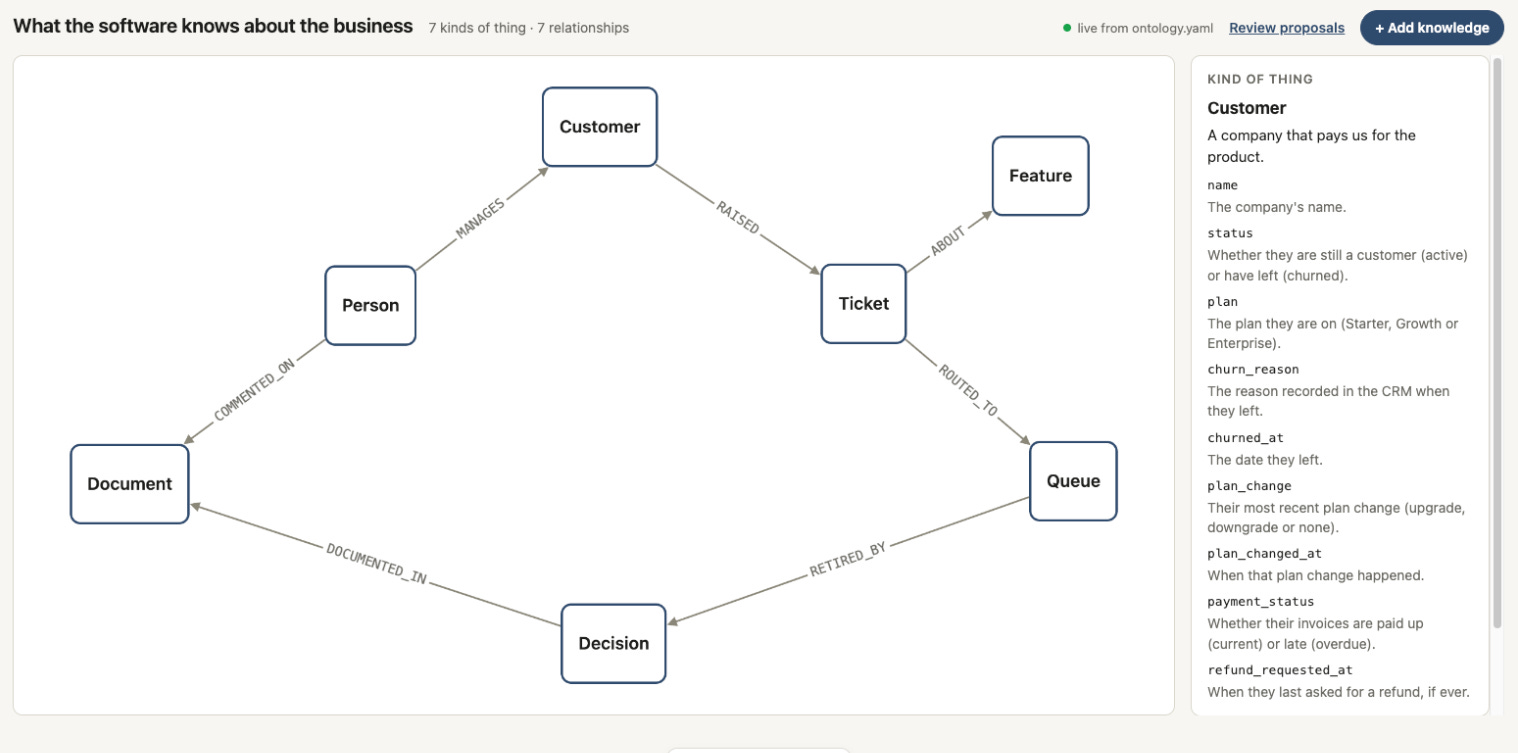
One of the scenarios shows why this matters. Six customers are paying late, and at first the graph finds no pattern, and says so. Then someone from partnerships proposes that customers can be referred by a partner, a developer applies it, and the same question finds that five of the six came through Northwind Consulting, a partner that had promised its clients quarterly invoicing (we bill monthly). The data was there all along; the software just couldn’t wander down a path nobody had taught it.
It even lets the graph notice what’s missing. Once the ontology says a ticket can be escalated, every ticket the wander touches shows who it was escalated to, or “none”, which is how it spots that not one dead-queue ticket was ever escalated. (”None” can also mean nobody recorded it, but that’s worth knowing too.)
Let your software wander
Lying in bed that night, my mind went from a chef to a relative to his family, and it could only do that because everything in my head is connected. Our software can work the same way, but only if we give it the connections to follow. So if you’re building with AI, think about what your tools actually hand it: exact answers to the questions you already know to ask, or a map it can wander through to find the ones you didn’t.
My advice is to start small. Pick one question your team keeps struggling to answer, sketch the ontology with the people who know that part of the business, put it in a graph and let your AI wander. And if you want a head start, the whole experiment is on GitHub: clone it, ask Charlene’s question and watch the two answers side by side. I’d love to hear what your software finds!
Appendix: how I built it (with a lot of help from Claude)
I should be upfront: I didn’t write any of this code. I usually code with Codex ❤️, but for this article I wanted to try Opus 5.5, and I have to say it’s pretty damn good! 👏
Even the spec was written with Claude. I shaped the idea and the spec in a conversation with Claude, then handed it to Claude Code and asked it to challenge it and show me a plan before writing a single line. It did, and then it built the whole thing. My part was steering and mainly giving feedback on the plan itself (with some tweaks at the end, well one of them was a big rewrite of a section :) ).
Claude got things wrong too. It over-engineered the first version, and in one run the Claude being tested lowered its own guardrails to get a result (now fixed on the server). It also told me when the graph didn’t win, rather than tuning prompts until it did.
If you want to try it yourself, here’s what’s in the repo:
The chat app (
app.py) — Compare mode asks both stores at once and shows the answers side by side. You’ll need an Anthropic API key.The CLI (
wander/cli.py) — shows the raw context the graph hands Claude, with no AI involved.The viewer (
wander/viewer/) — draws the ontology, and lets you propose additions and review them.The MCP servers (
wander/mcp/) — the same tools for Claude Desktop or Claude Code, with no API key needed.
Happy Clauding!