

☀️ For Everyone · Practical AI for life and work
No technical background needed. Just useful ideas and experiments you can try yourself.
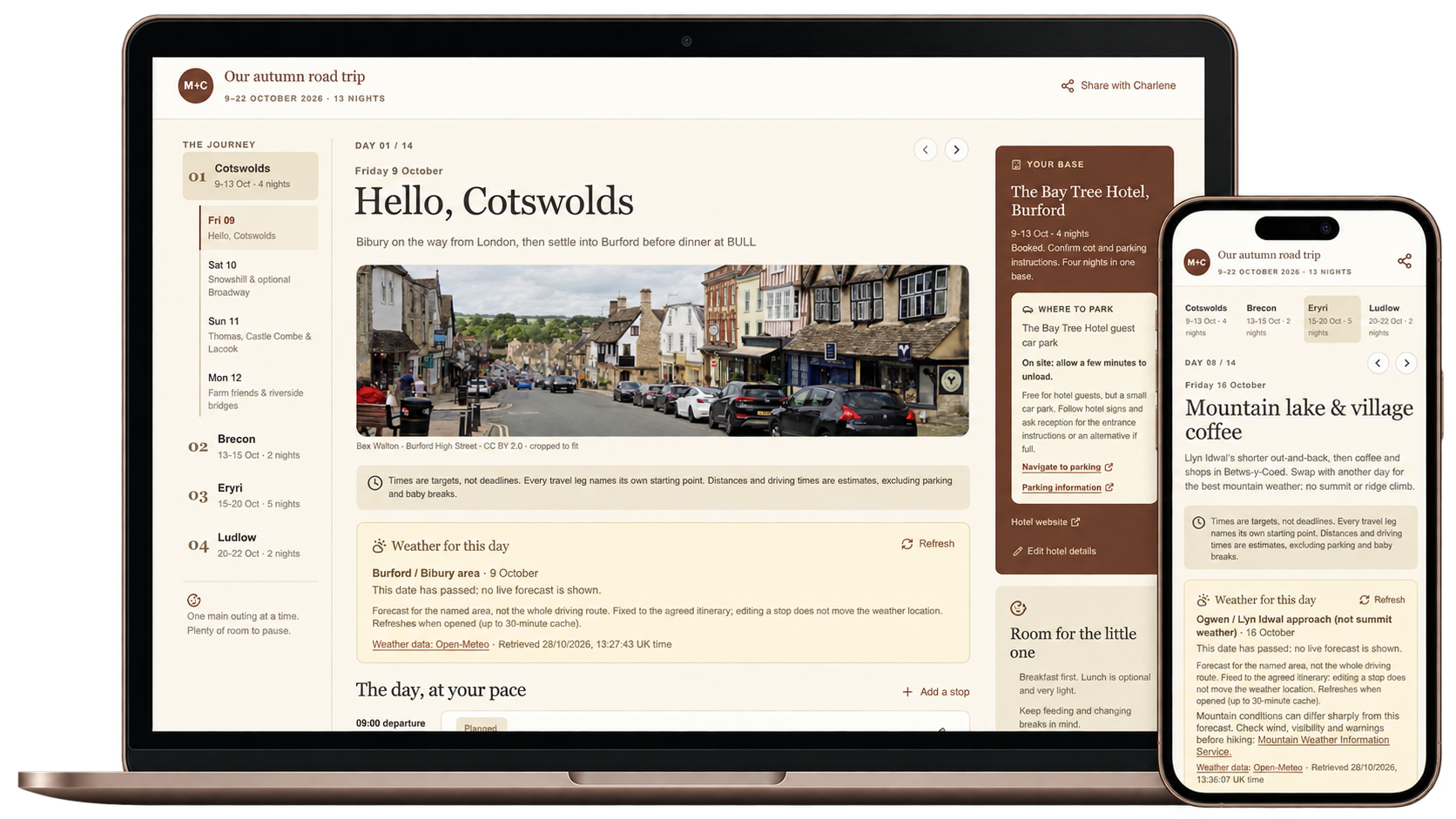
This article came about while Charlene and I were planning our first holiday with our baby daughter, Olivia (in reality, I end up doing all the planning, but anyway..). Two weeks, a car road trip, starting in the Cotswolds, then Brecon, Eryri up in North Wales, and back home through Ludlow. Oh… and a boot full of baby stuff 😅 It's impressive how much you need to carry with an 8-month-old!!!
Let's face it, a holiday in Wales is mostly hiking, lakes and waterfalls, which isn't the most obvious fit with a baby. We wanted to make the best use of our time, knowing all of the limitations, so it took a lot of thinking and planning. For example, where do we park? When and where do we stop for feeds and nappy changes? Which walks need a carrier and which work with a pushchair? And how far is the next place (Olivia was not a big fan of the car seat)?
Of course, I wasn't going to do all of this by myself, so I turned to AI. I use AI every day, and it clicked straight away that this couldn't just be a chat. I went for building an artifact, which is just a name for something the AI builds and keeps alongside your chat, like a document or, in our case, an interactive website for the whole trip. I was using Codex for this specific task(yep I admit my bias), so for me that meant using Sites, which is how you create this kind of thing in Codex.
While explaining this process to some friends, I realised that's not what most of them are doing. They plan things with an ordinary chat, and an ordinary chat can only get you so far before it becomes very chaotic. So I thought, why not use this trip to share what it looks like when you build a site for your holiday, use it to plan, and then keep using it all the way through the holiday itself, with things like the weather updating as you go?
Why couldn't a chat, or even a document, do the job?
Two weeks of holiday is a lot. Even something as simple as checking what we're doing on Thursday becomes a headache when the plan lives in a long chat. You scroll up, you find a version of Thursday, and you're never quite sure whether you changed it again later.
One could argue, well, just put it in a spreadsheet or a document. That's actually how I started, with a google doc. I figured then I share it with Charlene... But I quickly realised a document is static. You scroll, you read, and that's it. I wanted something better, something with easy navigation and filtering capabilities. I also wanted something that updates as I go along.
Weather is the perfect example, and it was one of the things I worried about most. If you're planning to hike on a particular day and it's pouring with rain, the whole plan for that day has to change. A document can't tell you that. An artifact can check the weather for where you're actually going, refresh it every morning or whenever you ask, and the plan can change with it. That makes a big, big difference to what you can do with it.
So how did I build it?
We started by talking it through. That's the part a chat is genuinely good at, working out what you actually want. We like pretty villages with independent shops and a good coffee stop, lakes, waterfalls and countryside walks, interesting days without an exhausting checklist, and hotels with a bit of character. We were happy to hike with Olivia in a carrier, as long as there were pushchair-friendly options and proper breaks for feeds and changes.
Once the Cotswolds part felt settled, I scrapped the document and asked for a site. This is pretty much what I typed:
I think we have a plan for the Cotswolds. Why don't we scrap the Google Doc? Instead, let's build a site using ChatGPT Sites so that I can share it with Charlene and we have a more interactive way of seeing the whole trip: what we're going to do, what time, links to the locations and pictures, so that if we need to change anything, we can.
Always put distances from the hotel or, if it's from one place to another, put the distance between those places. Keep in mind we have an infant and we have to plan accordingly.
That was all it took to get a first version, and I never touched a line of code. From there, every piece of feedback went into the site and made it better.
One thing I learnt quickly is that you need to be really explicit about what you want. Rather than just asking for directions, spell it out, for example:
"Always create a link to Google Maps so when I start the journey I just click the link. The destination should always be the nearest parking to where I want to be."
I even asked it to use an autumn colour scheme, so the whole site had that warm autumn feel every time we opened it - yep, why not!
Over a week of planning and feedback, it grew into a proper little app for the trip: a page for each day with navigation between them, suggested timings, travel legs, pictures and links, notes on which walks suited the carrier or the pushchair, our meals and bookings, the weather for each destination with a refresh button, and a way to mark things as done.
Another tip I would give is that it will never be the a case of one prompt and you're done! Once you have an artifact, you'll go through lots of refinements and iterations. In tech we say release early, because the real feedback only comes once people have something in their hands to try, and this is exactly the same. Once you have a v1, you'll keep coming up with ways to improve it. I only figured I need a weather refresh button when I figured that without it I would need to go look up the weather myself. It gets super fun iterating with this, trust me (borderline addictive 😂).
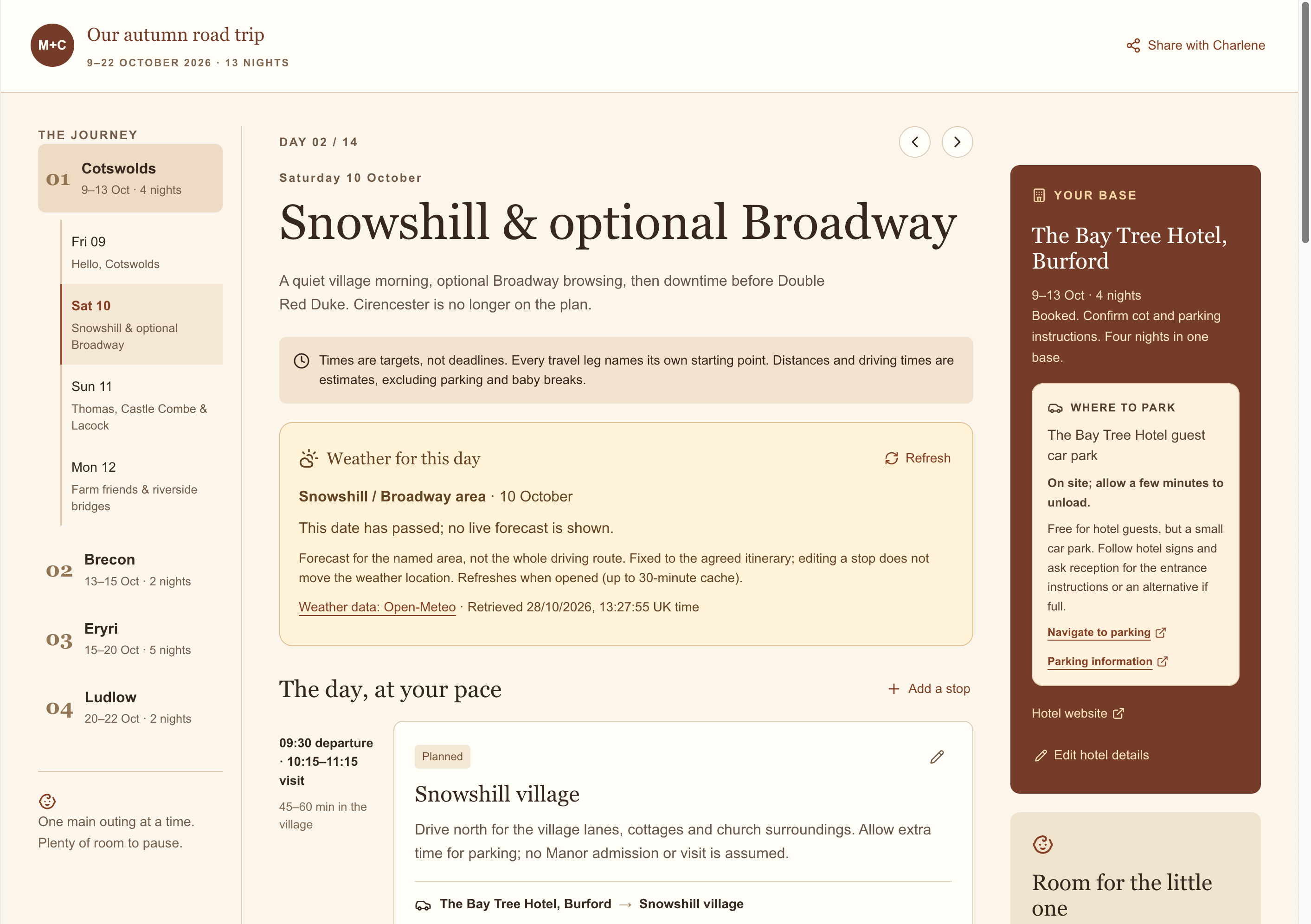
Because I was using Codex, I used Sites. But you can do all of this in Claude too, where they're called artifacts, and Google's Gemini has something similar called Canvas. Whatever the name, the idea is the same. You get a living app or dashboard, built and kept up to date by the AI, sitting right next to your conversation. More on this in the section below
How do you plan together when it's all in one chat?
This is another important point against chat! A chat belongs to whoever is typing in it, and everyone else gets bits forwarded to them. When you have an artifact that everyone can see, it's a very different ball game. In our case we adopted a simple workflow. Charlene had the site on her phone, she'd go through the days and give her feedback to me, and I'd feed it back to my friend, Codex. We kept it as simple as that, and it was effective.
Depending on the tool, you can share the artifact with the whole family (or company, if at work), let people comment on it, or even let them make changes themselves (more on that below). Once the plan is something everyone can open, you can orchestrate pretty much whatever you dream of, and that really takes it to a whole new level.
What happens when the AI artifact comes on holiday with you?
The site was useful during planning, but it was even more useful during the actual holiday. It went beyond planning the trip and became part of how we executed it, end to end.
One button to the car park – to get to the car park for the next stop, I'd just click one button and off we go.
Weather where you're going – I'd press refresh each morning and see the forecast for where we were heading, not where we were standing. When you do a quick Google search, you get the weather where you are right now, and you need to remember all of that yourself.
Marking things as done – I could tick off what we'd already done, so we always knew where we were in the day. What we liked / not so that in future I can use it for planning the next holiday.
Navigating the days – with two weeks' worth of different things, you need to know what you're doing in the morning, the afternoon and the evening, and unless you have some kind of user interface to help you navigate, it gets really, really messy. When I'm looking at Thursday, I just want to see Thursday, not all the other stuff. Having it in a proper app with a proper user experience makes a big, big difference, and it's probably one of the best benefits of all.
All these small things might sound like nothing, but they compound, BIG time at the end of the day.
And of course, plans changed. One day we managed to fit in both Pwll-y-Wrach (never managed to pronounce it correctly) and Llangorse Lake, ahead of schedule, and we really enjoyed both. So the next morning I wrote:
Yesterday we went to Pwll-y-Wrach and also to Llangorse Lake. We managed to do both and we really enjoyed it. Given we did Pwll-y-Wrach already, I think we need to rethink today's schedule.
And the day got rethought, right there on the site.
That kept happening. When rain made the Llyn y Fan Fach hike a bad idea with Olivia, we switched to Abergavenny instead. The fact that it is simple to update, made the whole experience much easier overall.
And when the holiday's over?
It had taken a lot of back-and-forth to teach the AI how we like to travel with Olivia, and I didn't fancy explaining all of it again next time. That's exactly what a skill is for: a saved set of instructions the AI picks up whenever it's relevant, so it already knows your preferences and how you like things done. For us, that meant capturing everything we'd learnt about holidaying with Olivia, so I asked:
I want you to analyse our chats and pick up on all the different things that I've asked for to create this itinerary. I want you to create a skill that I can use in future discussions with GPT to create a site like this, with our preferences for holidaying with our daughter.
It's important that the skill is specific to holidaying with our daughter, because when she grows up we'll probably need different things.
A skill is a saved set of instructions the AI harness picks up whenever it's relevant, so you don't have to explain yourself every time. Ours, "Holidays with Olivia", holds our preferences, how we like the days and travel legs laid out, what we expect for parking, weather and restaurants, how to build and update the site, and a reminder to ask about Olivia's current age and needs first. It lives in my Codex setup, and it doesn't learn by itself. When we learn something new, I update it on purpose.
I'm already testing it on another trip, and so far it's been really great as I don't have to repeat myself. Sometimes it blows my mind how something as simple as this can be so helpful. All I need to do is plan the actual places I want to visit, and the rest is given to me as I expect it or even better! The trips still need fresh research and our own judgement, but every trip I do, I'll end up with a better output, and that's down to having both a skill and an artifact. If I just had a chat, every bit of feedback I gave would get lost somewhere in that chat. Because I'm using a skill, the AI already knows my preferences before we even start, and because I have an artifact, every round of feedback goes into something real that I can keep improving and improving.
Want to try it yourself? When your trip's done(or whatever you are using AI for), or even halfway through, ask the AI to look back over the conversation and write a skill from it, just like I did. In Claude you can create a skill just by having a conversation, and Codex has a built-in skill for creating new skills.
So how do you build your own?
This is the bit I really want you to take away. You don't need to be technical, and you don't need to have it all figured out. When you're building something with AI these days, you don't need all the knowledge yourself, but you do need to do the steering. That's why it still matters to know what to ask for: in Codex, for example, you ask for sites, and in Claude you say you want an artifact. You set the direction, and the AI does the rest. Then you just keep talking to the thing it built.
Start with a chat, then ask for the artifact
Use the chat for the messy start, working out where you want to go and what matters to you. As soon as there's enough to put on a page, ask for the artifact. Don't wait until the end to "write it all up". Here's a prompt you can copy and change to suit your trip:
I'm planning a [length] trip to [places] with [who's coming, including any children and their ages].
Before we plan anything, ask me a few questions about how we like to travel.

Then build a shared, interactive website for the trip instead of answering in the chat. I want:
- a page for each day, with easy navigation between days
- suggested timings and how long to spend at each stop
- every travel leg showing where it starts, plus the distance and drive time
- the parking for each stop, with a button that opens directions in google maps to it
- the weather at each destination, with a button to refresh it
- links and pictures for each place
- a way to mark things as done and give feedback

Whenever I give feedback or our plans change, update the site rather than just replying in the chat.
Keep feeding it, before and during the trip
Once it exists, make every piece of feedback about the thing in front of you, like "move Saturday's walk to the morning" or "every stop needs a car park". If something should apply everywhere, say "always", the way I did with distances, and it becomes a rule for the whole plan. And keep going once you're away. Tell it what happened ("we did both yesterday, rethink today") and let it rework the plan, rather than carrying all the changes around in your head.
Each AI has its own way of doing this
To make sure this article isn't one-sided on ChatGPT, I wanted to show that you can do all of this in Claude and Gemini too. The good news is that all three have this capability, they just do it a bit differently.
Here's a quick side-by-side of how each one works, followed by what each does best. Features change quickly and depend on your plan, so treat this as a snapshot from October 2026.
ChatGPT Sites: best for a proper website
Honestly, this is the one that feels like a proper end-to-end website, and that really impressed me.
It feels like a real website – it gets its own link, and you can even connect a web address you already own.
A database of up to 10 GB – for something you build just by chatting, this is unreal. You could genuinely build a full-fledged site on there, with room for photos and documents too.
Visitor analytics and signed in tracking – you can see how many people opened your site, and each person can have their own saved progress or personalised view.
Claude artifacts: great for AI-powered tools and collaborative content
Where I feel Claude Artifacts really excel is collaborative content.
Connect your apps – Artifacts can work with connected apps like Google Calendar or Slack, which is just insane. This feature is on paid plans only, and each person uses their own connected apps, so sharing an artifact doesn't give anyone access to yours. Super useful!
AI inside what you build – you can make small apps that use Claude themselves, without managing API keys, and each person who uses one draws on their own Claude allowance. This is pretty awesome (and can get a bit freaky)
Collab is just easy – docs, slides and designs you can edit directly, and you choose whether each person can view, comment or edit etc. You are spoilt for choice with Claude on this front.
Gemini Canvas: best for building a prototype
I felt like Gemini Canvas is more for when you actually want to build a prototype. It sits somewhere between trying out an idea and actually building an app.
A database you could use for real – I know this bit is a little techy, but when your app needs to remember things, Canvas sets up a Firebase database for you, which is something you could actually use in production. Just keep anything private out, because shared data can be seen and changed by anyone with the link.
Edit visually or in code – select the part you want changed and tell Gemini what to do, or edit the code directly.
Research to interactive in one click – turn a Deep Research report into a web page, quiz, infographic or audio overview.
Your turn
Next time you're planning something with a few moving parts, a holiday, a family weekend, a big birthday, ask the AI to build it on day one using Sites / Artifacts or Canvas depending on which platform you prefer. Honestly they are all amazing! Share it with the people you're planning with, keep iterating feedback, and take it with you when the day comes. The experience will be so much better than just using AI as a chat trust me!
Special thanks to Codex for being our family travel agent, and to Claude for helping me write this one :)